



Mastering BigQuery Series
For organizations leveraging Google Analytics, particularly with large volumes of data, the standard reporting interface can sometimes feel limiting. Accessing raw data, performing complex analyses, or integrating with other data sources often requires a more robust solution. This is where Google BigQuery comes in, offering a powerful, serverless, and fully managed enterprise data warehouse. While BigQuery provides lightning-fast queries, multi-cloud flexibility, and built-in machine learning capabilities, its power comes with responsibility, particularly regarding cost management.
Understanding and optimizing BigQuery usage, especially when dealing with large datasets like Google Analytics 4 (GA4) exports, is crucial. Compute costs, which are associated with querying data, make up a significant portion of BigQuery expenses – often 85% to 90% of the total BigQuery cost, and up to 50% of an organization’s overall Google Cloud bill. Storage costs are a much smaller fraction. This highlights the importance of optimizing query processing rather than just focusing on storage.
Let’s explore some key BigQuery optimization opportunities derived from recent expert discussions, focusing on techniques accessible to Google Analytics users looking to enhance their data capabilities.
Mastering BigQuery Costs Through Smart Querying
One of the most immediate areas for optimization lies in how you write your queries. Simply understanding how BigQuery processes data can lead to significant cost savings and performance improvements.
BigQuery is a columnar database. This means that when you run a query, you are billed based on the amount of data scanned across the columns you select. Therefore, avoiding the use of SELECT * is a fundamental best practice. Instead of selecting all columns, explicitly list only the columns you need. This simple change can dramatically reduce the amount of data processed and thus lower costs.
For datasets structured by date, such as daily GA4 export tables, using table decorators or table suffix like _TABLE_SUFFIX in your WHERE clause is highly effective for limiting the scan to specific date ranges. For example, instead of querying a wide date range and filtering by a date column in the WHERE clause (which still scans the entire range), referencing the _TABLE_SUFFIX directly limits the scan only to the partitions matching that suffix. This technique is very important if you’re working on a partitioned table. Applying a LIMIT clause alone does not reduce the amount of data scanned, so it should not be relied upon for cost savings.
Other useful techniques for querying include using TABLESAMPLE SYSTEM (XX percent) during development to work with a percentage of your data instead of the full table. For large aggregations, leveraging approximate functions like APPROX_COUNT_DISTINCT can also provide cost savings by processing less data. Additionally, you don’t need to run a query just to preview data; BigQuery provides a “Preview” tab for exploring table data.
Optimizing Large Datasets: Partitioning and Clustering
Beyond selective querying, structuring your tables using partitioning and clustering can dramatically improve query performance and cost-efficiency, especially for large GA4 datasets.
Partitioning divides a table into segments based on a specified column, typically a date or timestamp column like event_date or event_timestamp for large datasets. This allows queries that filter on the partition column to scan only the relevant partitions, preventing full table scans and reducing costs. Partitioning is a great option for reducing query costs when filtering on date.
Clustering further organizes data within partitions based on the values of specified columns. This is particularly useful for sorting and filtering large datasets using high-cardinality categorical columns, such as user_pseudo_id or event_name in GA4 data. When you query a clustered table and filter on the clustering columns, BigQuery can efficiently locate and scan only the necessary data blocks within the partitions, improving data retrieval and reducing costs. For optimal optimization, consider combining partitioning by date and clustering by a relevant user or event identifier. You can add up to 4 fields in Cluster by clause.
This is the single most important technique for optimizing how BigQuery reads your table.
Want to further understand how leveraging BigQuery can impact your business? Connect with us today.
Mastering Your Costs with Reservations
While the power and scalability of BigQuery are unmatched, its pricing models can sometimes lead to an unpleasant surprise on your monthly bill. This is especially true for companies experiencing rapid growth in their data usage.
In this section, we’ll dive into one of the most effective strategies for controlling your BigQuery spending: switching to a slot-based reservation model. We’ll break down the two main pricing models, explain why reservations are a game-changer, and provide a best-practice guide for when and how to make the switch.
On-Demand vs. Flat-Rate: Understanding the BigQuery Pricing Models
BigQuery offers two distinct pricing models for query execution, each with its own pros and cons. Understanding them is the first step toward optimization.
- On-Demand Pricing: This is BigQuery’s default and most flexible model. You are billed based on the amount of data processed by each query. This “pay-as-you-go” approach is perfect for smaller teams or new projects where usage is low and unpredictable. A key feature of on-demand is its elasticity: queries can access up to 2,000 slots of processing power to return results as quickly as possible. The downside? Costs can fluctuate wildly, making it difficult to budget and forecast.
- Capacity/Flat-Rate Pricing: With this model, you pay a fixed monthly fee for a dedicated number of BigQuery slots. A slot represents a unit of CPU, RAM, and network resources used to execute a query. By committing to a flat-rate plan, you get a predictable, consistent cost, regardless of how much data you process. The trade-off is that you are limited to your purchased capacity. During peak times, queries might take slightly longer to execute as they compete for the same pool of slots.
The Power of BigQuery Reservations: Predictable Costs and Optimized Performance
BigQuery Reservations are the mechanism that allows you to move from the default on-demand model to a flat-rate one. By purchasing commitments, you secure a fixed number of slots. The cost of all bytes processed by queries is then included in your flat-rate price, giving you total control over your spending.
Reservations are purchased in units of BigQuery slots. A commitment of 50 slots, for instance, costs approximately $1,500 per month (costs may vary), and it provides a reliable foundation for your analytics operations. You know exactly what you will be spending each month, making budgeting for data analytics a much simpler task.
An effective strategy is to start small and incrementally add slots based on your usage. This allows you to scale your capacity in a measured, cost-effective way.
Best Practice: When to Make the Switch to Reservations
So, how do you know when it’s time to move from on-demand to flat-rate? Google provides an excellent tool for this: the BigQuery slot estimator.
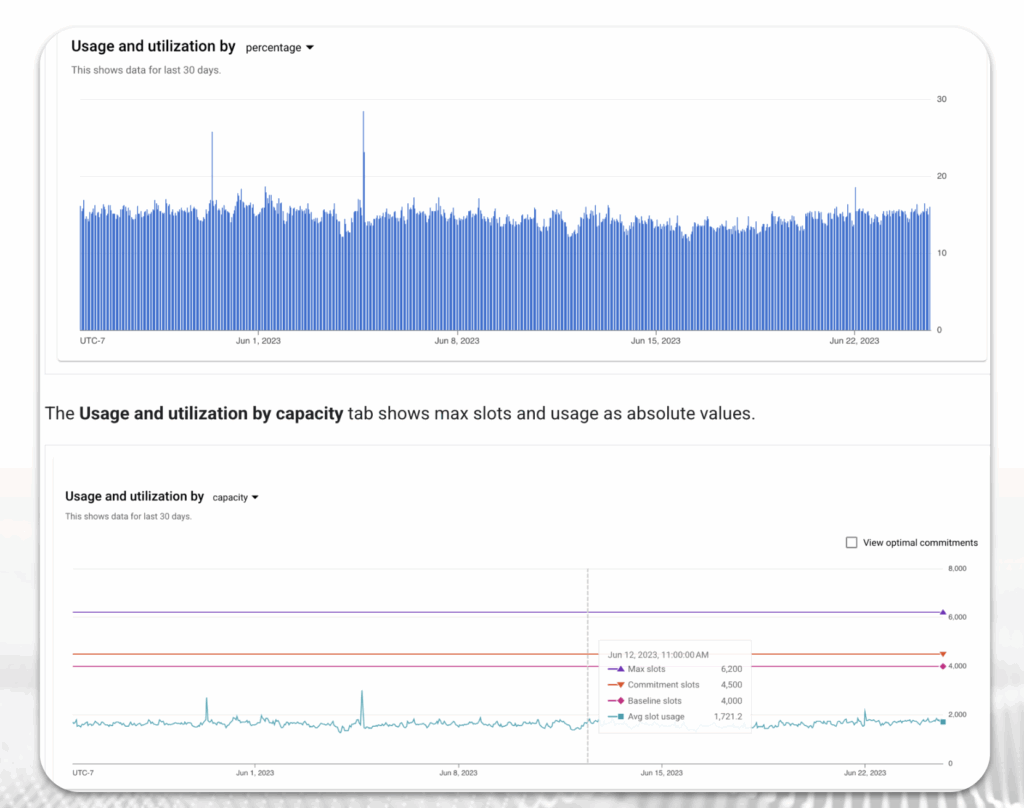
This tool analyzes your past on-demand query usage and estimates your slot consumption. By using this, you can gain a clear understanding of your current processing needs.
Our recommended best practice is to start thinking about Flex slots, or Monthly/Annual reservations once your average slot usage consistently goes above 100 slots.
Here’s a strategic approach:
- Monitor Your Usage: Use the BigQuery slot estimator to regularly track your on-demand slot consumption.
- Identify a Baseline: Once your usage stabilizes and frequently exceeds 100 slots, you have a solid baseline to work from.
- Start with Flexibility: Consider Flex slots, which are a short-term, 1-minute commitment. This is a great way to test the waters and see how a flat-rate model performs for your workloads.
- Incrementally Add Capacity: Purchase a base number of slots that can handle your average workload (e.g., a 100-slot monthly commitment). You can then continue to use on-demand pricing for any excess capacity during peak usage, giving you a hybrid model that balances cost control with performance.
- Scale Up as You Grow: As your team and data needs expand, incrementally increase your slot commitments to cover more of your peak usage, ultimately moving more of your spending to the predictable flat-rate model.
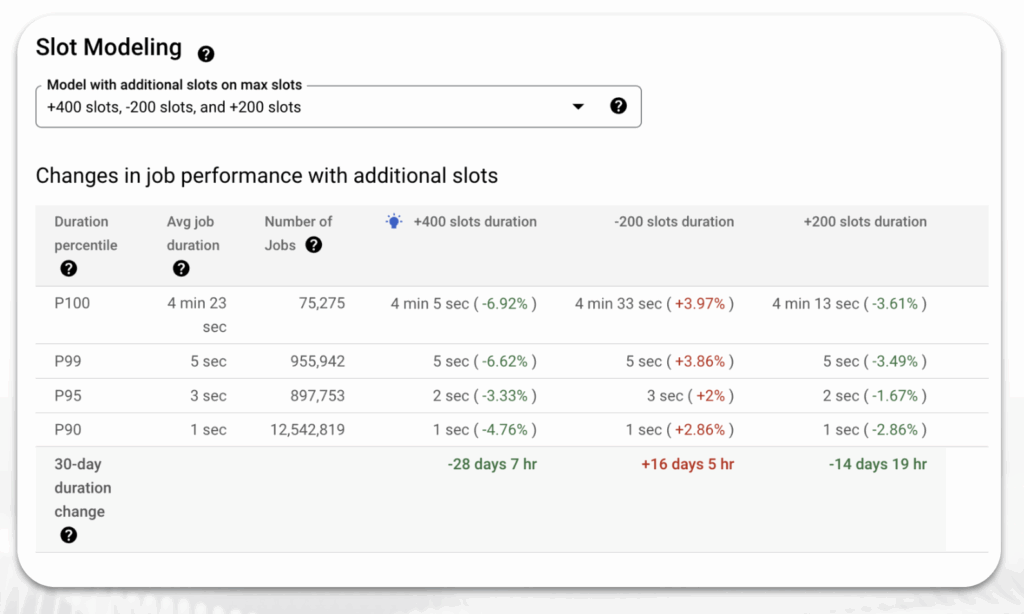
By taking a data-driven approach to your BigQuery slot consumption, you can proactively manage your costs, ensure predictable spending, and optimize your analytics performance without compromise.
We love to discuss with you how leveraging BigQuery provides greater insight and efficiency. Have a chat with us.
Learning from the Past for Faster Queries
BigQuery has recently introduced history-based optimizations, a powerful technique that leverages machine learning to improve query execution. This technique learns from the patterns and characteristics of previous similar queries to improve execution speed and resource efficiency. By analyzing historical data from past executions, it can significantly enhance query performance, leading to faster run times and reduced resource consumption.
Note: During its public preview, history-based optimizations demonstrated impressive results, with some customer workloads experiencing up to a 100x improvement in query performance.
These optimizations work together to reduce data processing, improve resource utilization, and enhance overall query performance. Here are some of the key mechanisms:
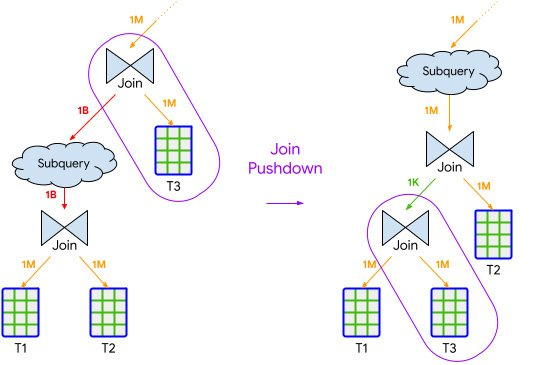
- Join Pushdown
- Inserts selective semi-join operations throughout the query.
- Reduces the amount of data scanned and processed in parallel execution paths.
- Often implemented through internal optimizations like partition pruning.
- Semi-join Reduction
- Executes highly selective joins first.
- Reduces the data processed by moving selective joins earlier in the execution order.
Leverages insights from data distribution to improve performance.
- Join Commutation
- Swaps the left and right sides of a join operation.
- Aims to reduce resources consumed during join execution.
- Leverages join commutativity to optimize hash table building and probing.
- Parallelism Adjustment
- Improves query latency by optimizing work parallelization.
- Adjusts the initial parallelism level based on known workload distribution.
- Particularly effective for queries with large, compute-heavy stages.
Storage Types & Time Travel: A Strategic Approach to Data Management
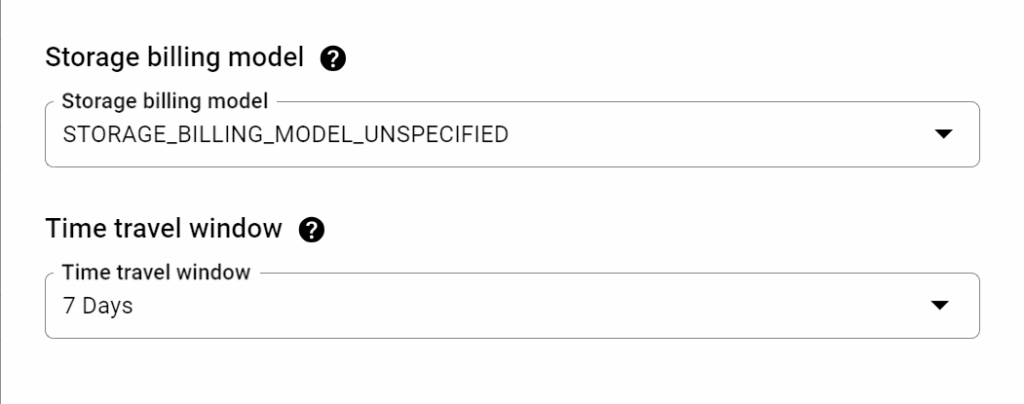
BigQuery offers two different storage billing models: Logical and Physical. Choosing the right one can have a significant impact on your monthly costs.
- Logical Storage: This is the default billing model. It is based on the size of the fully decompressed data, which includes all columns even if they are sparsely populated. In this model, you are not billed for the bytes used by Time Travel or Fail-Safe storage.
- Physical Storage: This model is based on the actual, compressed size of your data. The key difference is that you are billed for both Time Travel and Fail-Safe storage in this model. While the unit price of physical storage billing is double the cost of logical storage, it can still be more cost-effective if your data has a high compression ratio.
Time Travel Considerations
BigQuery’s Time Travel feature is a powerful safety net, allowing you to query previous states of a table and even recover accidentally deleted data. However, it can significantly increase your physical storage usage. While it’s an invaluable feature, it’s worth periodically reviewing your historical snapshots and determining if they’re necessary to retain.
A simple yet effective way to lower costs is by reducing the time travel window (e.g., from 7 days to 1 day). These settings are managed at the dataset level and can be found in the “Advanced options” section.
The Compression Ratio is Key
The unit price of physical storage billing is double the cost of logical storage billing. Thus, a key consideration for switching is your data’s compression ratio. If your compression ratio is less than 2, organizations will not benefit from using a Physical Storage model.
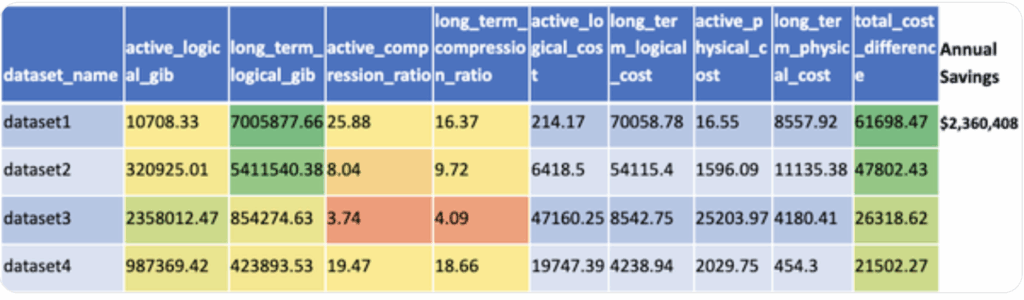
Example: Some customers have seen remarkable storage cost reductions when switching. For instance, a dataset with an active and long-term compression ratio ranging from 16 to 25 could see a storage cost reduction of 8 times, leading to a substantial decrease in monthly costs from over $70,000 to just over $8,500.
However, be cautious of high Time Travel usage. A dataset where 96% of the active physical storage data is used for Time Travel is not suitable for Physical storage billing, as you would be paying for all of that historical data.
Recommendation: Conduct a BigQuery cost-benefit assessment between Physical and Logical billing. Google has provided a helpful query to determine how to calculate the price difference at the dataset level. This will empower you to make an informed decision and optimize your storage costs.
The Power of a Semantic Layer
For repeatable analyses, reporting, or dashboards built on top of your BigQuery data, introducing a is highly recommended. BigQuery offers query caching, but this is often on a per-user level. If multiple team members run the same query, each person might incur the cost (unless the query cache is hit for that specific user).
A semantic layer involves creating intermediate tables that store the results of common or complex queries. Instead of dashboards or end applications querying the raw data tables directly, they query these pre-aggregated or transformed semantic layer tables. This means the expensive query to generate the underlying data only needs to be run once (e.g., on a scheduled basis) to populate the semantic layer table, and subsequent accesses from multiple users or applications retrieve data from this optimized, cached table, significantly reducing compute costs.
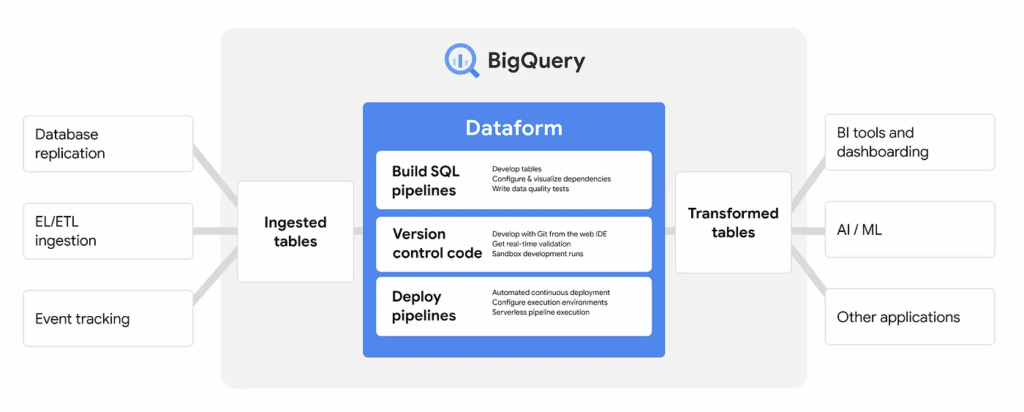
There are tools that exist within GCP to help build and manage this semantic layer. Dataform, now known as Pipelines within GCP, is a free product that helps build this logic, store it (e.g., in GitHub), manage dependencies, and visualize the data flow through different layers (source, staging, production). While you still incur the BigQuery storage and compute costs for the operations Dataform runs, the tool itself is free to use.
Have a free conversation with our data optimization experts.. Connect with us today.
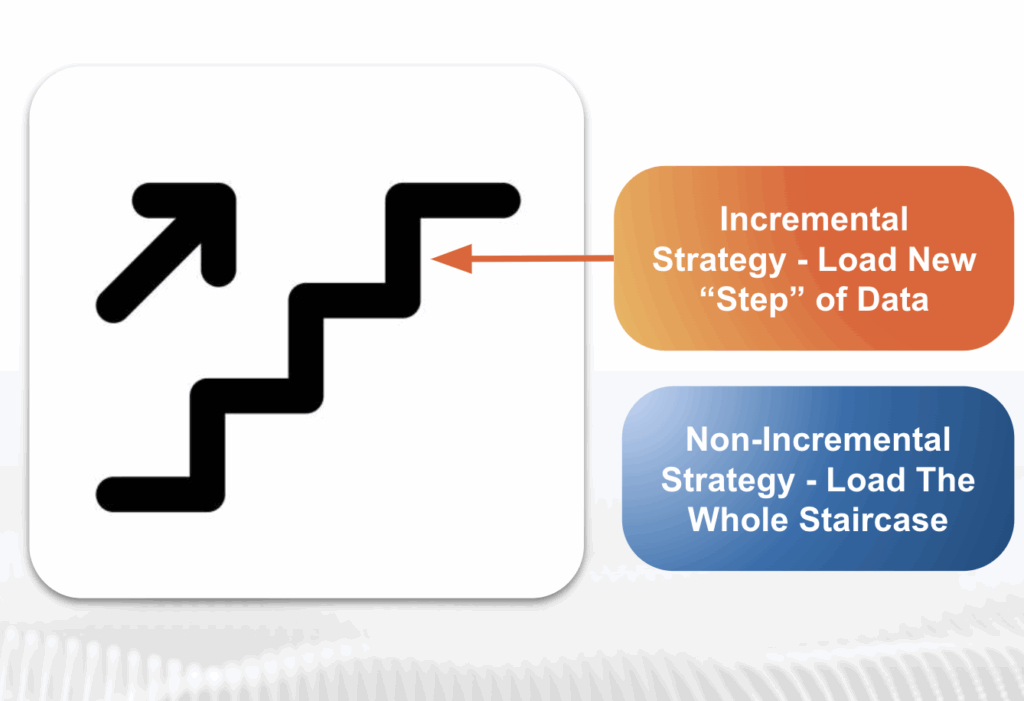
Incremental Strategies: Load New “Steps” of Data, Not the Whole Staircase
An incremental strategy is a fundamental optimization technique for data loading. Instead of reloading and replacing an entire dataset every time new information arrives, this process focuses on only loading the new data that has become available. This simple change in approach can have a massive impact on your costs and performance.
By adopting an incremental approach, organizations will:
- Save time, storage, and processing costs.
- Reduce the vicious cycle of replacing massive amounts of data to load small amounts of new data.
Note: This happens more than users realize and can drastically impact budgets.
Think of it like this:
- Incremental Strategy: You only load the new “step” of data that has been added to the staircase.
- Non-Incremental Strategy: You reload the entire staircase from the beginning just to add one new step.
By strategically loading only the data you need, you can dramatically improve the efficiency of your data pipelines.
Administrative Cost Controls
Beyond query and table optimization techniques, organizations can implement administrative measures to manage and control BigQuery spending.
One fundamental control is setting quota limits on query usage. You can set daily quota limits at either the project level (limiting the aggregate usage for all users in a project) or the user level (limiting usage for specific users or service accounts). This allows you to cap the amount of data that can be processed per day.
Another useful control is restricting billable bytes for individual queries. You can set a maximum number of bytes that a query is allowed to process. If a query is estimated to exceed this limit before execution, it will fail without incurring a charge, providing an error message indicating the limit was exceeded. This is particularly recommended during development to prevent accidentally running very large, expensive queries.
Finally, setting up budgets and alerts in Google Cloud Billing allows you to monitor your actual spend against planned budgets. You can trigger email notifications when certain budget thresholds are reached (e.g., 50% or 90% of the budget used). These alerts can help your team understand if spending is accelerating quickly and prompt action, such as optimizing queries or potentially increasing the budget.
Optimization Recommendations: Your Action Plan
To help you get started on your BigQuery optimization journey, here is a summary of our recommendations, organized by effort and impact.
Quick Wins
- Use selective querying techniques by avoiding SELECT * and only querying the columns you need.
- Turn on history-based optimizations in your project settings to leverage BigQuery’s built-in intelligence.
- Reduce the time travel duration from the default 7 days to 1 day if it aligns with your team’s needs for data recovery.
Monitor & Evaluate
- Set up administrative cost controls with BigQuery budgets and alerts to proactively manage spending.
- Understand your average usage in terms of both storage and query costs by regularly monitoring your BigQuery billing and metrics.
- Partition and cluster tables wherever you can to drastically reduce the amount of data scanned and processed by your queries.
- Evaluate the logical vs. physical model for your datasets to see if a switch to physical billing would be more cost-effective based on your data’s compression ratio.
Long Term Strategy
- Look into reservations to see if a flat-rate model makes sense for your team’s predictable workload and budget.
- Think about building semantic layers in BigQuery to create a consistent, reliable source of truth for your business users, which can also optimize query performance.
- Switch to incremental strategies for loading tables wherever you can to save significant time, storage, and processing costs over time.
By leveraging a combination of these strategies, you can build a highly performant and cost-effective analytics environment in BigQuery.
Contact our BigQuery experts at InfoTrust today.
