



Conversions that marketers once measured cleanly have slipped out of view due to browser restrictions, signed-out sessions, and cross-device journeys. This leaves attribution models with major gaps and bidding algorithms optimizing on misguided data. Google built Enhanced Conversions to close that gap with consented first-party data.
First-Party Data Foundation
First-party data is information your business collects directly from customers with their consent, such as email addresses, phone numbers, and purchase history. It sits closest to the source, so it tends to be the most durable, privacy-resilient signal you own.
Revenue Uplift
(BCG + Google)
More Conversions
(Google)
Lower Cost/Conversion
(Google)
Properties that link a Google Ads or Marketing Platform account to Google Analytics see a 23% lift in conversions and a 10% drop in cost per conversion. Enhanced Conversions is one practical way to put first-party data to work inside your measurement stack.
Explaining Enhanced Conversions
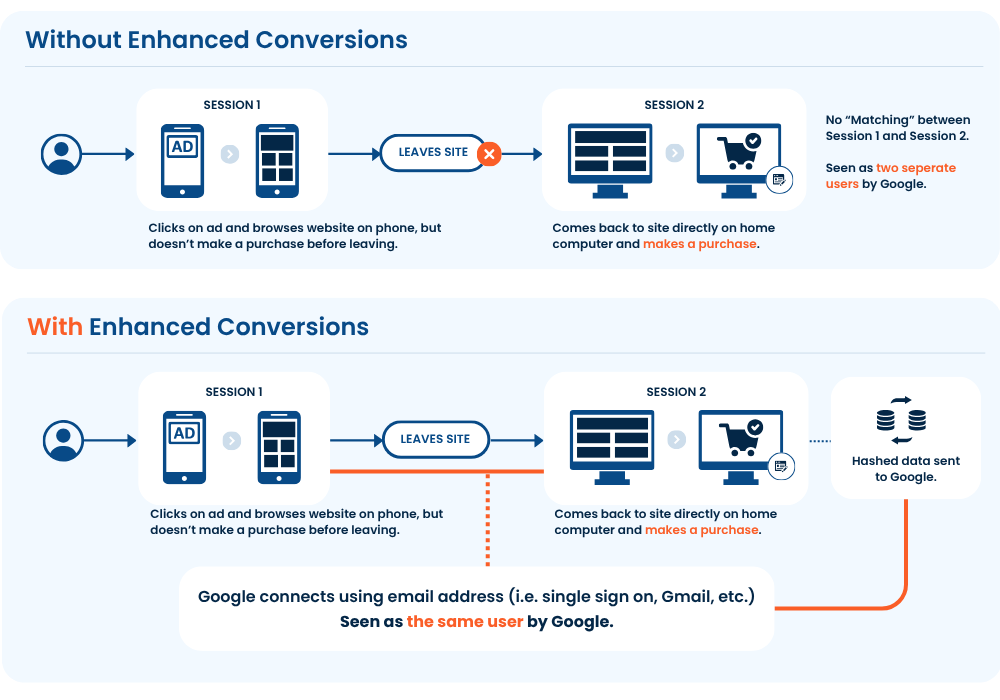
Enhanced Conversions improves the accuracy of conversion measurement using consented first-party data. When a customer converts (i.e. makes a purchase), details they have shared such as an email or phone number are hashed then sent to Google (i.e. Google Ads, Google Analytive). Google then matches the hashed values against signed-in accounts to recover conversions that cookies alone would miss. The feature lives in two places, Google Ads and Google Analytics, but uses the same mechanism.
Within Google Ads, it supplements your conversion tags with this hashed first-party data, which improves conversion accuracy and unlocks stronger Smart Bidding. Because the match spans devices and signed-in sessions, it recovers conversions that standard tracking drops, so campaigns optimize on fuller data. As of June 2026, Google combined the web and leads versions into a single on/off setting that accepts data from website tags, Data Manager, and the API at once.
The Analytics version is currently in open beta, and is enabled through utilizing user-provided data collection. Similar to Google Ads, the consented first-party data you collect then improves the accuracy of the conversions you measure and send to Google Ads. However, it also improves media audiences by enabling the building Customer Match audiences.
How it works: a cross-device example
Say someone clicks your ad on their phone at lunch but doesn’t buy. That evening they return to their computer and complete the purchase. Cookies treat those as two unrelated visitors, thus being seen by Google as separate. Enhanced Conversions hashes the email or phone shared in each session, matches both to the same signed-in Google account, and connects the sessions (in this case giving proper attribution to that original ad).
Tactical Value of Implementing
Going beyond theory, there are some tangible benefits those who implement Enhanced Conversions will see:
- More complete cross-device and cross-channel attribution.
- Stronger inputs for Smart Bidding, which can lift return on ad spend.
- Demographics and interest reporting built from consented, signed-in data.
- Customer Match support for richer remarketing audiences.
How to Enable Enhanced Conversions in Google Analytics
Enabling Enhanced Conversions is largely a configuration job.
- Link Google Ads. Connect your GA4 property to a Google Ads account, which is a prerequisite for the feature.
- Turn on user-provided data. In Admin > Data collection, switch it on and accept the user-provided data policy.
- Confirm consent is flowing. Google won’t process the data unless your terms are accepted and consent signals are granted, so a working consent setup has to come first.
- Choose how data is captured. Use the Google tag, Google Tag Manager, or the Measurement Protocol for offline events. Within those you can rely on automatic detection, point to specific CSS selectors or JavaScript variables, or send a code snippet for the most reliable formatting (recommended).
- Pick your fields. Email is the most effective field, but adding phone and address raises the match rate.
- Validate. Confirm that hashed user data is firing on your conversion events before you trust the reporting.
Consent is a prerequisite
Enhanced Conversions can only use first-party data that customers have agreed to share.
Google won’t process anything unless your terms are accepted and consent signals are set to granted, so the strength of your consent capture sets the ceiling on how much the feature can do. Treating consent as a value exchange, with clear opt-ins and a properly configured Consent Mode gives Enhanced Conversions the most to work with while keeping you compliant.
What to weigh before enabling it in GA4
Still an open beta
The feature continues to evolve and is subject to change.
A reporting delay
Model and attribution improvements can take up to a month to appear in your reports and bidding.
Coverage gaps
The feature is not available for properties in the Health industry category, and app data streams have limited support.
Accepting the policy is permanent
Turning on user-provided data means accepting a policy you can’t un-accept. You can still stop the data from being processed anytime by unchecking the setting, so switching it on doesn’t lock you in.
Early adopter challenges
Early implementations on the original infrastructure surfaced several rough edges: conversion data taking 10 to 12 days to process, conversions vanishing when paired with another dimension in explorations or the API, the User ID dropping out of BigQuery exports, and session source and medium misattributing heavily toward direct / (none).
In November 2025, Google rebuilt the user-provided data infrastructure and stopped using it as a reporting identity, which targets the attribution problem. New activations now land on this system without those degradations.
Is it worth turning on?
Enhanced Conversions pays off when you capture first-party data at the point of conversion and Google Ads drives meaningful volume for you. The fit weakens for organizations that don’t capture a significant amount of first-party data, those running mostly on app streams, or those in sensitive industries. Whatever you decide, the first-party data underneath the feature is worth building.
Ready to Dive Deeper?
Webinar: How Our Customers are Driving 15%+ More Conversions
This session breaks down Google Data Strength and walks through the two moves that give you the biggest return: Google Tag Gateway and Enhanced Conversions.
