



Every tag on your site has a story: where it came from, what called it, and what data it may be sending out. Tag Inspector gives you the full picture, both at a glance (Tag Load Method) and in detail (Stack Trace). Having this detail when establishing and maintaining your website’s compliance is critical as managing how tags load is foundational to ensuring compliance.
Sometimes things will go wrong. An agency will launch a tag without approval, a vendor calls a new technology, or an update to the site causes the consent signals to be lost. Tag Inspector lets you identify what is causing the issue(s) so you can fix it quickly.
Identifying What is Causing a Tag to Load/Fire
Tag Categorization and Control
Tag Load Method
To effectively honor consent choices, you have to properly control the method that is loading the tag. In the case of piggybacking tags (tags loading other tags), you have to identify and categorize the parent tag correctly.
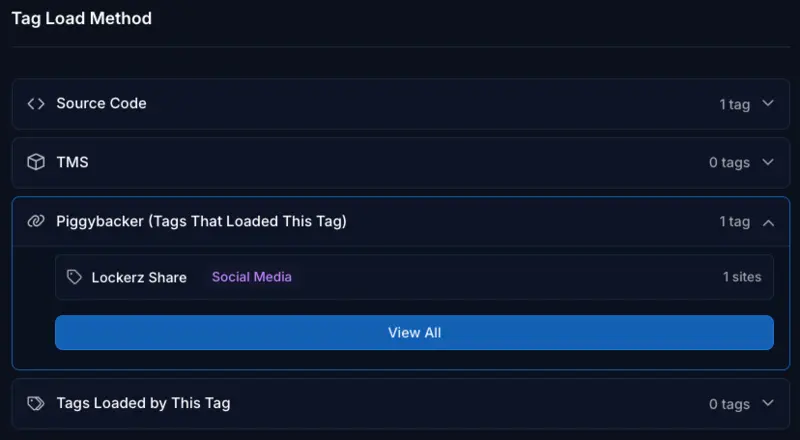
If we take “AddtoAny” as an example, we can see within Tag Inspector that it is loading via piggybacking 100% of the time.

By inspecting the tag details, we can identify the parent tag, “Lockerz Share” in the case, which is responsible for the load. In this example, “AddtoAny” is being considered a “Targeting” tag, while “Lockerz Share” is considered “Social Media”. So, the organization would either need to reevaluate how it is categorizing “AddtoAny”, or potentially recategorize “Lockerz Share” as “Targeting” so that the user consent is properly respected.
Utilizing Stack Trace
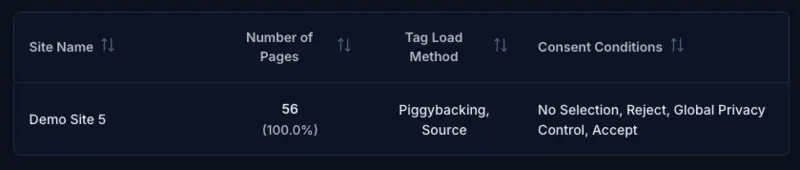
Tag load behavior is also critical when addressing policy violations. Continuing with the “AddtoAny” example, I can see that it’s in violation of several user consent choices (No Selection, Reject All, and Global Privacy Control [GPC]). In the cases of those violations, it’s loading as Piggybacking.
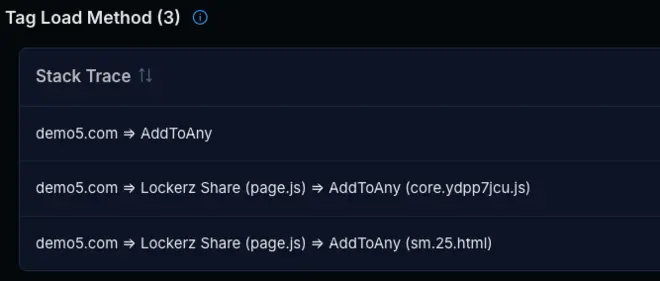
If I needed more details to identify what is causing the tag to load I could utilize the Stack Trace. This is a little more technical, but it shows me the exact Javascript file for “Lockerz Share” that is injecting the “AddtoAny” tag.
As the site owner, you are responsible for all customer data leaving your site, regardless of whether a tag was placed there intentionally or arrived via another tag. Used in conjunction with the higher level details, the Stack Trace points to exactly what needs to be addressed if issues persist. For example, what needs to be wrapped in consent logic or have a consent trigger added so that I can properly honor whatever choice the user made.
